

2019年5月21日星期二

How to fix "one of your disks needs to be checked for consistency"

We start up our desktop or laptop PC as normal, and suddenly a screen appears. It says “one of your disks needs to be checked for consistency”, this page answers the questions of how to fix it without loss data from your disk.

 Bitwar Data Recovery for Windows download Bitwar Data Recovery for Mac download

Most of us have seen this happen, one of your disks needs to be checked for consistency. It says that your hard drive needs to be checked for consistency, and launches a scan of the hard drive. What does this mean? Is the hard drive damaged?
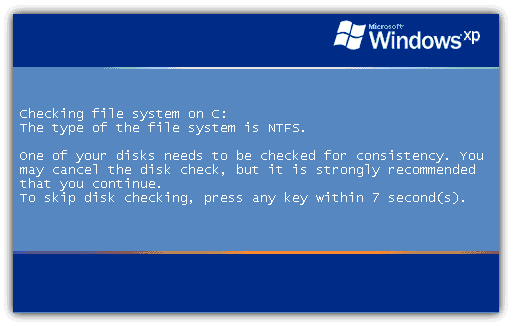
one of your disks needs to be checked for consistency
 
Usually, this disk check won’t uncover a problem. However, certain types of PC crashes can cause disk errors, if you press any key before the countdown ends, the disk check will be aborted. However, when you restart computer, you’ll get same error message again because operating system still thinks the drive needs to be scanned and checked. So when you see this pop up, it’s a good idea to let it run its course, even if that takes a while. If you interrupt it, Windows will still ask you again the next time you reboot.

Disable automatic disk check

In Windows XP through Windows 7:

      1. Click Start on your windows.
      2. Right click on Command Prompt and click Run as Administrator
      3. Type chkntfs /x c: and press Enter
 
In Windows 8 and 8.1:
 
      1. Press Windows Key + X
      2. Click Command Prompt (Admin) (Windows PowerShell (Admin) in Windows 8.1)
      3. Type chkntfx /x c: and press Enter

Windows will no longer perform these automatic scans. It’s a good idea to check your drive for errors on a regular basis yourself.

Recover lost files with free data recovery software

If the file is lost during the fix operation or disk needs to be formatted, considering this, you need to recover lost files from your disk.
 
We recommend you to try free data recovery software to rescue files deleted by chkdsk. Bitwar data recovery is the free data recovery software since it is compatible with any devices such as digital camera, hard drives, SD cards, Memory cards, phones, media players and portable drives. You can recover audios, videos, pictures, archives, emails, and documents. Moreover, this program lets you preview files that have been recovered.


Read more?How to fix "one of your disks needs to be checked for consistency"

Easy Data Recovery Software - 30 Days Free Trial

There's nothing more upset while losing data, especially it's a disaster if we don't have any emergency plan, what can we do to recover lost data? Today in this article, I will show you an easy file recovery software that can be trusted to recover your precious data.
Easy data recovery software - 30 Days Free Trial

Why can the lost files be recovered by easy data recovery software?

Actually, the lost files still exist in the hard drive, no matter you deleted the files and emptied the Recycle Bin or formatted the hard drive. The files are hiding in the hard drive after the system marked the space where have the lost files as free space. You can still get back those files by erasing the free space mark with easy data recovery software 

3 questions before downloading easy data recovery software.

Everyone knows the pain of data loss; the only idea in our mind is recovering lost data as soon as possible. However, before we are searching for easy data recovery software in Google, there are 3 questions worth thinking about:
 
1. Does the software offer friendly user interface?
2. Does the software offer the Free Trial chance?
3. Is the software powerful enough to recover lost data?
 
Then, I would like to suggest downloading Bitwar Data Recovery.

Bitwar Data Recovery for Windows downloadBitwar Data Recovery for Mac download 

Why can you rely on Bitwar Data Recovery?

Bitwar Data Recovery fully compatible with windows 10/8/7/Vista/XP, the software specialized in recovering docs, photo, video, music and archive files. With the latest data recovery algorithm, Bitwar Data Recovery has the ability to support accidental deletion recovery, format recovery and raw recovery from SD card, memory stick, PC/Mac, hard drive, camera storage mediums, USB drive and Recycle Bin etc.
 
Most important, Bitwar Data Recovery is really an easy file recovery software, we offer a humanized interface with step-by-step mode for you to recover lost data safety and completely. 

About Key features of Bitwar Data Recovery,please read:Easy Data Recovery Software - 30 Days Free Trial

Jak odzyskać usunięte lub utracone partycje na dysku Windows?

  Po uruchomieniu komputera zauważyłeś, że jedna z partycji zniknęła? Twoje ważne dane mogą być przechowywane na tej partycji. Jak odzyskać ...