Have you ever received the “Corrupt master file table” or “windows cannot recover master file table” error when booting up your Windows computer? In such case, download and try Bitwar data recovery to restore the corrupted master file table and get back your data quickly is a wise choice.
When you try to access a partition on your windows, you may get the error "Corrupt master file table". Windows will attempt to recover master file table from disk.And it reads ":\ is not accessible. The file or directory is corrupted and unreadable." What will you do then?
What is "master file table"?
Master file table, the short form MFT, is a file contained in NTFS file system. MFT is the most important part in NTFS file system, as it stores all information about a file such as size, time, date stamps, permissions and data content. When a file is added to NTFS partition, its entry will be added to MFT. When the file is deleted from NTFS volume, its NTFS entry will be marked as free for reuse. If master file table gets corrupt, files in the NTFS file system volume will be inaccessible.
There are several solutions you can do to master corruptfile table.
When you get "windows cannot recover master file table" error on your windows, you should backup and recover the data first.We recommend you to download and try Bitwar data recovery to restore your data. The program works extremely well to recover files from corrupted hard drive or raw disk in Windows.
Read more? Fix "Windows Cannot Master File Table"
2019年9月17日星期二

2019年9月9日星期一
How to format a USB Drive on Mac
How to format a USB Drive on Mac?Want to erase data from the hard drive?
Not every flash drive out there can be used with a Mac computer right out of the box. Some flash drives have to be formatted first before you can store files on them. In addition, Formatting indeed repairs a corrupted, damaged, inaccessible and even RAW USB or SD card but will erase all saved data. However, losing data is something we don’t want. So is it possible to format USB flash drive on Mac without losing data.
Is it possible to format USB flash drive on Mac without losing data?
Sometimes, USB drive get corrupted and become raw or inaccessible due to various reason. And you will find the USB drive cannot be recognized, or the system will prompt an unformatted error after plugged the drive, then should we format the USB drive and lose all of data?
The answer is no, you are recommended to perform a fast data recovery to recover files from the flash drive before formatting it if you want to keep all your files. Now let’s talk about how to restore the lost data back first.
How to restore the lost data from the corrupted USB flash drive?
Bitwar Data Recovery for Mac can be used to recover data lost due to deletion, partition errors, formatting, virus attacks, system failures and a variety of other reasons. it is the best data recovery software for mac since it is compatible with any devices such as digital camera, hard drives, SD cards, Memory cards, media players and portable drives. Moreover, this program allows you to preview scanned out data to make a selectively recovery.
read more? How to format a USB Drive on Mac
2019年9月5日星期四
How to fix SD card not reading on PC
SD card cannot be read on your computer? In this article, you will find how to fix the "SD card not reading" error. Bitwar Data Recovery software can help you.
Note: If your essential data in SD
card which you don't want to lose, please stop using SD card
immediately and take it out of the device.
1. Causes of SD card not reading error
The SD card might be logically or physically damaged due to various factors. Here lists some common causes:
1. Connection issue.
2. SD card is locked.
3. Improper operation.
4. Drive letter lost.
5. Corrupted driver.
6. Partition loss.
7. The SD card is physically damaged.
Readmore? How to fix SD card not reading on PC
Windows Cannot Access the Specified Device Path or File
If the files are inaccessible in your PC and the "Windows cannot access the specified device, path or file" appears, the ways below and Bitwar Data Recovery can help you.
You may receive see the image below when you are trying to start a program or open a file on your Windows computer. But do you know the possible reasons that make Windows fail to access the specified device, path or file as normal? And do you want to restore the lost data and files?
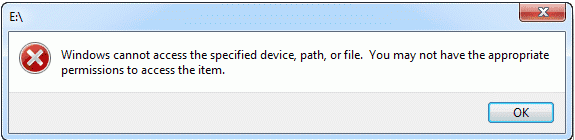
1. You don't have permissions to the file, the folder or the drive.
2. You are clicking a shortcut to access a file on an external drive or a network location that is now not properly connected to the PC or is not available.
3. The file has been deleted or moved to other location. Or the file or its shortcut is corrupt.
4. The file may be blocked by Windows.
5. The file is blocked by the anti-virus software of your computer.
Read more?[Solved] Windows Cannot Access the Specified Device Path or File
You may receive see the image below when you are trying to start a program or open a file on your Windows computer. But do you know the possible reasons that make Windows fail to access the specified device, path or file as normal? And do you want to restore the lost data and files?
Causes of the error:
You may not have the appropriate permissions to access the item because of the following reasons.1. You don't have permissions to the file, the folder or the drive.
2. You are clicking a shortcut to access a file on an external drive or a network location that is now not properly connected to the PC or is not available.
3. The file has been deleted or moved to other location. Or the file or its shortcut is corrupt.
4. The file may be blocked by Windows.
5. The file is blocked by the anti-virus software of your computer.
Read more?[Solved] Windows Cannot Access the Specified Device Path or File
订阅:
博文 (Atom)
Jak odzyskać usunięte lub utracone partycje na dysku Windows?
Po uruchomieniu komputera zauważyłeś, że jedna z partycji zniknęła? Twoje ważne dane mogą być przechowywane na tej partycji. Jak odzyskać ...

-
Having troubles on accessing your Gmail or Google account? Forgot the password or even the email address? Relax, use g.co/recover for hel...
-
Windows或Mac作業系統經常會丟失重要的檔案,或誤操作刪除、或誤格式化丟失、甚至中毒、系統出錯等。這誰都有遇到過。有什麼難的呢?我們可以到google上找尋一些好用的檔案救援軟體Data Recovery wizard來救回這些丟失的重要檔案。 搜尋好用的檔案救援軟體 ...
-
默認情況下, 還原點 Win10 功能已成為Windows作業系統的一部分。該功能使您可以快速將Windows PC還原到較早的日期,而不會丟失個人檔案。例如,如果您的PC今天開始工作,則可以將PC復原到以前的日期(當PC運行良好時),以盡快解決Windows出現的問題。 根據磁...


