2020年12月17日星期四

TechTool Pro APFS Data Recovery for Mac OS X

 Can you recover data from Mac APFS drive? 

What is the TechTool Pro?

TechTool Pro is a comprehensive utility application for Mac, which includes options for testing and repair, data recovery, and disk defragmentation. 


However, it doesn't offer a complete data-recovery package indeed. It can only recover data when the drive has minor damages, such as accidental deletion or damaged volume. Also, it doesn't offer a free upgrade. You have to spend USD$20 for each update which is too expensive.


Therefore, TechTool Pro APFS Data Recovery is not the right choice. When it comes to Mac Apfs data recovery software to recover data from APFS, Bitwar Data Recovery for Mac is the best one.

Best APFS data recovery software

Bitwar Data Recovery for Mac deserves the best APFS data recovery software. Compare to TechTool Pro APFS Data Recovery, and it can be applied in various data loss situations for APFS data recovery and other file systems on Mac. With Bitwar Data Recovery for Mac, you can recover deleted/lost files from encrypted APFS drive, formatted APFS drive, unreadable, unmountable, inaccessible APFS drive, and from deleted/lost APFS partition. Anyway, someday when you're unfortunately facing data loss issues, feel no hesitated to download this software to recover them.


Read more?  TechTool Pro APFS Data Recovery for Mac OS X

2020年12月8日星期二

Fix "Boot Configuration Data is Missing" on Windows

 You might ever encounter the "boot configuration data is missing" issue when you boot your windows. This page lists four ways to help you fix such error. And you can try the best data recovery software - Bitwar Data Recovery to restore lost data. 


What's the Boot Configuration Data?

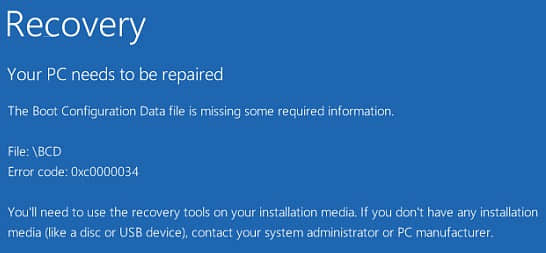
The Boot Configuration Data (BCD) is a firmware-independent database for boot-time configuration data. It is used as a new Windows Boot Manager. It replaces the "boot.ini" file which was used in old operating systems. If the Boot Configuration Data file is missing in Windows 10, you cannot boot your computer normally, and you'll see an error message, as shown below.

boot configuration data is missing windows 10
 

However, don't worry! If your Windows 10 is unable to boot due to error "The Boot Configuration Data file is missing," you can try the following solutions to troubleshoot this issue.

Solution 1. Run Startup/Automatic Repair

To fix the BCD is missing issue, you can use the recovery tools on your installation media like DVD or USB to repair your Windows installation. Just follow these steps:
 
1) Insert the Windows bootable installation disk and restart your PC. When prompted to Press any key to boot from CD or DVD, press any key to continue.
2) Select your language preferences in the Windows Setup interface, and click on Next.
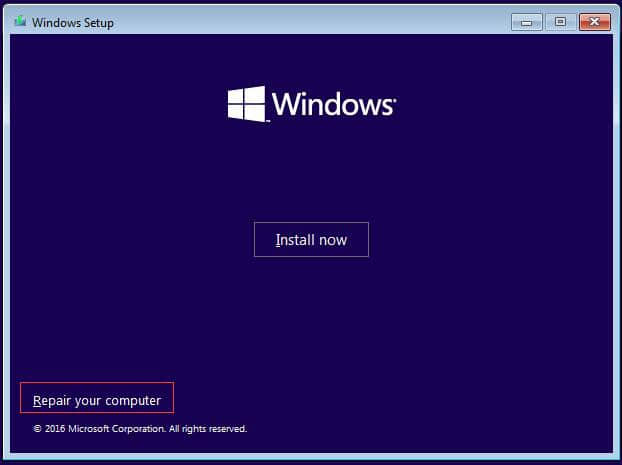
3) Click on Repair your computer in the bottom-left.

boot configuration data is missing windows 10
 

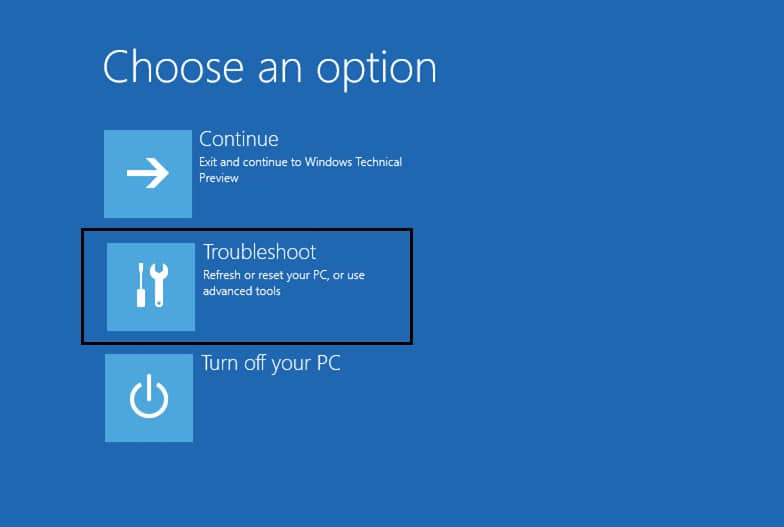
4) Select Troubleshoot.

boot configuration data is missing windows 10
 

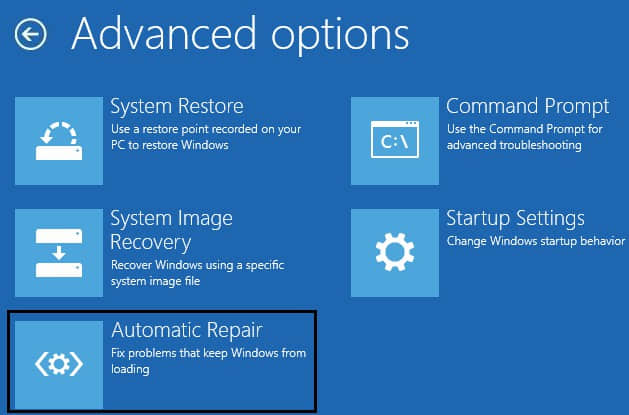
5) On the Advanced options screen, click on Automatic Repair.

boot configuration data is missing windows 10
 

6) Wait until the Windows Automatic Repair complete.
 
Restart Windows and check if the error has been fixed.

Solution 2. Rebuild the BCD on Windows by using the Bootrec.exe tool

You can rebuild the BCD by using the Bootrec.exe tool in the Windows Recovery Environment.
 
1) Insert the Windows bootable drive and boot from it.
2) Select your language preferences, and click Next.
3) Press Shift + F10 to open the command prompt.
4) Type the following commands and press Enter after each of them:
 
bootrec.exe /rebuildbcd
bootrec.exe /Fixmbr
bootrec.exe /Fixboot


About another solutions,please read: Fix "Boot Configuration Data is Missing" on Windows 10

Jak odzyskać usunięte lub utracone partycje na dysku Windows?

  Po uruchomieniu komputera zauważyłeś, że jedna z partycji zniknęła? Twoje ważne dane mogą być przechowywane na tej partycji. Jak odzyskać ...