2019年11月27日星期三

How to Recover Accidentally Deleted Call Logs in iPhone?

Sometimes when we need to re-dial someone, unfortunately, we couldn't make the call, maybe we've accidentally deleted call logs in iPhone before. How to get back the call logs? Relax, we have Bitwar iPhone Data Recovery that can help us out. 

 1. Installation of Bitwar iPhone Data Recovery.

Step One

Go to Bitwar Data Recovery official website: https://www.bitwar.net/ios-data-recovery-software/
Bitwar iPhone Data Recovery has two versions: For windows and For Mac, you can select the target version you need and then click download.

Step Two 

Connect your iPhone with the computer after launched Bitwar iPhone Data Recovery, please make sure the USB cable is stable enough while connecting with the computer to avoid some unexpected problems. 

2. How to use Bitwar iPhone Data Recovery to recover accidentally deleted call logs in iPhone?
There are two options on the Bitwar iPhone Data Recovery for you to select before recovery.
 
Option One: Recover from the iOS device.
It's an option for you to scan the iOS device directly to find recently deleted data.

6.Bitwar iPhone Data Recovery -Recover from iOS Device 
 
Option Two: Recover from iTunes Backup File.
If you have used iTunes to back up your data before with your Mac or Windows computer, you can select this option to scan the Backup file and then to recover.

 

7.Bitwar iPhone Data Recovery - Recover from iTunes Backup File 
Option One: Details of How to recover accidentally deleted call logs in iPhone from Recover from iOS device option. 

Step One

Select Call logs and hit Start Scan.
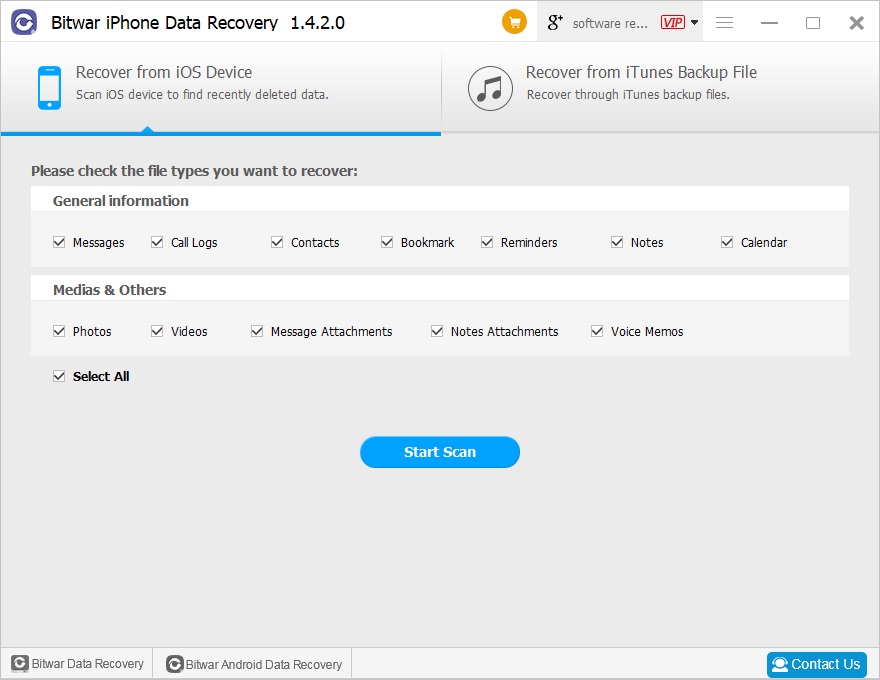
 
Recover from the iOS device 

Step Two

Check Call logs in the left file type tree and you can see the deleted call logs listing in the window; Click the name to preview the number.
 
Then select what you need and hit Recover.
 

How to Recover Images/Photos from PC

I tried to back up all of my photos to an external hard drive today, the photos are about 50 GB and the estimating time is still counting. Therefore, I just went out. Heartbreakingly, when I came back, I found the transfer stopped, much worse, all of my photos gone away. How can I get these photos back to my PC? "


We know how painful to lose all of the photos, maybe it's the trove of family photos, or wedding trip photos, party photos, etc. How can we lose such memorable photos?

Fortunately, we have the best photo recovery app: Bitwar Data Recovery that can help you out.

Bitwar Data Recovery supports to recover any of the images/photos/pictures file types, common file types like JPG, JPEG, PNG, GIF, and BMP, etc. It offers 3 easy steps to recover photos/images/pictures from SD card, memory stick, PC/Mac Computers, hard drives, digital storage mediums, USB drives, etc.

Most important, the software is 100% clean without virus, backup, spyware, and malware; you don't need to worry again that software will infect your system to destroy other important data.

Bitwar Data Recovery is combining with the latest data recovery algorithm, while the software is launching, it searches every piece of files located on the hard drive to make sure all of the files can be easily recovered. Today let's go and see step by step to find out how to recover photos with the best photo recovery app.

Read more?Best Photo Recovery APP – Recover Images/Photos from PC

2019年11月7日星期四

How to fix Xbox one green screen of death when you faced the error?

Have you ever faced the Xbox one green screen of death issue before or you are now having the Xbox one stuck on Loading green screen? Here's the tutorial to lead you how to fix this issue and then guide you a file recovery on Xbox one.

Bitwar Data Recovery for Windows downloadBitwar Data Recovery for Mac download

Xbox One is a line of eighth-generation home video game consoles developed by Microsoft. Announced in May 2013, which is one of the most popular game consoles like Nintendo Switch, PlayStation Vita, Project Shield, etc. Likewise, Xbox One is using hard drive to store games as others, and we found that many users had such issue on the internet:

When I turn on my Xbox one, it sticks on loading green screen, but it does not continue. I waited for even 2 hours but still the same. How can I fix this issue, please help!

Don't panic, if you cannot find the answers through Google, try to find the answers here! 

Solution One. Offline Update the Xbox One system to fix the green screen of death

To update Xbox one offline system, you'll need:

1. A Windows-based PC with an Internet connection and a USB port.
2. A USB flash drive with a minimum of 4 GB of space formatted as NTFS.

Tips: You'll have to format the USB flash drive as NTFS partition before you try to perform the formatting, backup all of the necessary files onto the computer.

Then follow the below tutorial to save the ZIP file on the USB flash drive:

Step 1. Connect this NTFS USB flash drive with the computer.
Step 2. Download Offline System Update file OSU1 from http://www.xbox.com/xboxone/osu1
Step 3. Save the update .zip file to the computer.
Step 4. Unzip the file by right-clicking on the file and extract update.zip.
Step 5. Copy the $SystemUpdate file from the .zip file to USB flash drive.

Note: Please copy the files to the root directory of USB flash drive and make sure there are no other files on the drive. Unplug the USB flash drive from your computer once you finished the copy.

You can now try to enter into the Xbox One Troubleshooter interface by pressing and holding BIND and EJCT button for about 10-15 seconds and then press Xbox button, after hearing 2 power-on beeps, release the BIND and EJCT button, you can see the Xbox One Startup Troubleshooter interface now.

Now, connect the USB flash drive with Xbox One and then select Offline System Update to finish the update. Normally, the Xbox one will reboot and green screen issue won't happen again, plug off the USB flash drive and enjoy yourself now.

Solution Two: Hard restart to fix Xbox one green screen issue

Press and hold down on the Power button on the Xbox One for 10 seconds, after that, the system will restart and generally, the green screen of death issue will be fixed.

About another solutions,please read: 3 Solutions to Fix Xbox One Green Screen of Death 2019

2019年11月1日星期五

Free Download USB Flash Drive Data Recovery Software for Windows 7

I accidentally lost important files from a USB flash drive. It's very important to me, how can I restore it? USB flash drives are portable and small in size and can be carried around with Plug and play. However, due to physical damage and improper use of USB flash drives, they typically cause file loss. To restore important files from a USB flash drive, you need to stop using it because you might overwrite the data. In addition, look for a USB flash drive data recovery software that can safely recover your data. Like Bitwar Data Recovery Software. This efficient and useful tool will allow you to retrieve data like photos, videos, music, document files, archive files from the computer, external hard drive, USB flash drive, SD Card, etc.Free download USB flash drive data recovery software for windows 7https://www.bitwar.net/data-recovery-software/.

The main features of Bitwar Data Recovery Software:
●You can recover lost or deleted files, photos, audio, music, emails from any storage device effectively, safely and completely.
●You can recover data from recycle bin, hard drive, memory card, USB flash drive, SD card, digital camera, and camcorders.
●Supports to recover data for sudden deletion, formatting, hard drive corruption, virus attack, system crash under different situations.
●Preview before recovery allows you to make a selective recovery. You can preview lost files, including common photos, Word, Excel, PDF, CAD, RAR, PSD, etc., as many as 300 different file types.
●Supported OS: Windows 10/8/7/XP/Vista, Mac OS X (Mac OS X 10.6, 10.7 and 10.8, 10.9, 10.10 Yosemite, 10.10, 10.11 El Capitan, 10.12 Sierra) on iMac, MacBook, Mac Pro, etc.

Jak odzyskać usunięte lub utracone partycje na dysku Windows?

  Po uruchomieniu komputera zauważyłeś, że jedna z partycji zniknęła? Twoje ważne dane mogą być przechowywane na tej partycji. Jak odzyskać ...