2021年3月22日星期一

Fix The Request Failed Due to A fatal Device Hardware Error

 The request failed due to a fatal device hardware error or not accessible fatal Device Hardware Error is a commonly seen error that causes data loss from Western Digital or Seagate hard drive.

Yesterday, a customer sent us an email and asked why his computer appearing the request failed due to a fatal device hardware error and he couldn’t access the Seagate hard drive. Then, he asked us for help and finally fixed the issue and get back his deleted files.

That’s why today we would like to tell about this issue and show you the steps to fix the request failed due to a fatal device hardware error and recover deleted files.

What is the Request Failed Due to A fatal Device Hardware Error?

To explain what is the request failed due to a fatal device hardware error happens on WD or Seagate hard drive to whom does not meet such issue before, we took a screenshot as below:

Generally, you’ll get an error message showing that X: \path name is not accessible. The request failed due to a fatal device hardware error. Yet, you may receive such location is not available error message no matter from the hard drive, SD card or on Disk management on Windows 7/8/10.

At this moment, the system just informs you the device is going to the end of its life. You should hurry to download the hard drive data recovery software in order to rescue the data from the hard drive.

Consider the vital data on the hard drive, the earlier you perform the hard drive recovery, the faster you can retrieve data.

The best solution to recover data from inaccessible partition/folder/drive?

From the previous data recovery tutorials we posted on the tutorial section, you probably agree that losing data no matter from accidental deletion, formatting or even worse scenarios, such as the request failed due to fatal device hardware error, you need to format the disk before you can use it; USB shows 0 byte or any other issues from any of the storage devices, there’s still not the end of the world. We still have the chance to recover the valuable data.

The first thing we need to do is download the data recovery program to fix fatal errors. Here we strongly recommend the Bitwar Data Recovery, which is dictated to allowing users to perform hard drive recovery with few clicks.

Simply click the download button to free get the Bitwar Data Recovery and then install on different partitions or devices, this is the way to make sure the data on partition or device won’t be overwritten.

Read more? 3 Ways to Fix The Request Failed Due to A fatal Device Hardware Error

Bitwar Data Recovery comes handy to recover your data with ease.

Easeus Data Recovery Crack

 Have you ever found the Easeus data recovery license code free right now? Moreover, seeing that Easeus Data Recovery Wizard 12.8 has limits on recovering lost data? Or, need 2019 best free data recovery software? Then, you are coming to the right place, here is the best free and full version alternative file recovery software for you to retrieve deleted or lost files.easeus data recovery 

How to Get Easeus data recovery crack?

Easeus is one of the leading data recovery companies that developed the data recovery wizard since 2004, with decades of development, the latest version of Easeus data recovery wizard 12.8 becomes the hot pick in the computing world. However, the license of Easeus isn't cheap that should take you over $69.95 to purchase.

There are many people now searching the Easeus data recovery crack with the serial number, kickass, keygen, license key, license code, activation code from Google to help them restore the loss of data. However, I am not forcing you to waste of your precious time on finding the Ease Data Recovery Crack!

The reason is Easeus data recovery wizard is a data recovery tool as other data recovery software will achieve the same goal. Most importantly, there's no need again for you to worry about the viruses, dangerous backdoors bundled with the cracked version.

Stop Wasting Your Time on Easeus Data Recovery Crack

If you are keeping search in Google and click every website that claimed with Easeus data recovery software free download full version with the key, serial number, kickass, license code, keygen generator, activation code, etc., I have to say you are losing your precious data forever. Both of us have known that the data couldn't be overwritten by new data; therefore, the best choice is to recover lost files soon as we can. Download, copy or write new data into the partition where have your lost files will cause permanent data loss, and you will lose your precious data forever.

Moreover, you have to prepare yourself to take the risk on the dangerous infection by virus, Trojan, malware, adware, backdoor that packaged with Easeus Data Recovery crack. Even worse that there will have a system crash, file corruption, personal data leak, and permanent data loss if you insist on using Easeus Data Recovery Crack.

Indeed, you deserve the 100% virus-free, 100% CLEAN and free data recovery software for windows 10, 8, 7, which can quickly help you restore the data you want.

Free data recovery software alternative to Easeus Data Recovery Crack

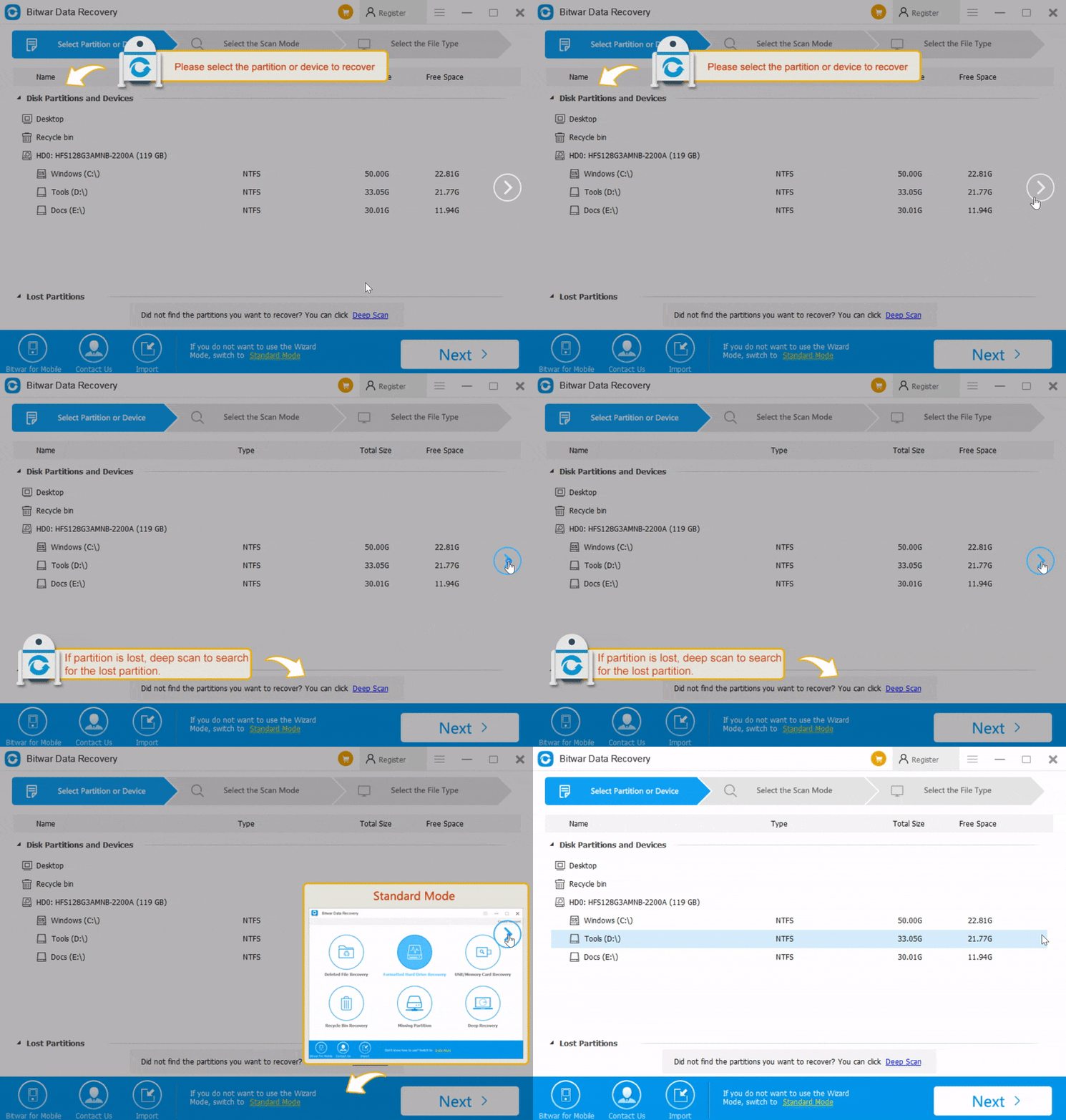
Here I strongly recommend you to use Bitwar Data Recovery, its step-by-step interface has clear enough guidance for any newbie users, first of all, you will feel no hassles on using the software, while the software is providing the animated feature instructions for the first run, which means, it can change your impression that the data recovery software isn't only for experienced users to use.


Easy data recovery software - first run


Moreover, if you still feel puzzles on using the software, you are encouraged to contact our real-time chatting support where you can find the Contact Us chatting button at the bottom of the software, or you can send to support@bitwar.net while the operator isn't online after working time, and we will reply to you as soon as we received the emails.


What's more, Bitwar Data Recovery helps you recover photos, documents, audio, video, and archive files after emptying the Recycle Bin, formatted the partition & memory card, even you can get back data from the damaged & inaccessible SD card, hard drive or external USB drive, etc. with free Bitwar Data Recovery.

Data Loss is like a disaster, to save our vital data as soon as we can, the best way is to stop using the computer right away, and the only idea you should bring in your mind is to run the data recovery software immediately, for different data loss scenarios, we should use different scan mode to find deleted or lost data, anyway, the step-by-step interface and the short descriptions under each mode will guide you on how to do next. Bitwar is always insisted on developing the easiest but powerful software as we can and keep the features updated gradually to conquer more and more complicate data loss situations.


Want to read more articles about easeus data recovery license code free? please click here


https://www.bitwar.net/895.html

2021年3月17日星期三

Files disappeared from Windows 10

 Have your desktop folders or files disappeared from Windows 10? You might lose your users files or personal documents, pictures, videos, installed programs, games, etc. This article will tell you how to recover lost data from Windows 10.

Windows 10 becomes very hot since its release. However, have you ever had the experience of suddenly losing important files in Windows 10 without knowing the exact cause? You may have opened the folder and then try to view or edit the files, only to find they disappeared. Why?

Why Files Disappeared on Windows 10?

Following are the most common situations in which you might lose your users files or personal documents, pictures, videos, installed programs, games, etc.


  1. Windows 10 automatic upgrade or update (desktop files and installed apps are the most likely to be removed);

  2. The virus deleted or hid personal files;

  3. You logged in a new user account;

  4. The hard drive is failing;

  5. Mistakenly deleted;


Once you understand how files disappear, choose one of the following methods to recover deleted, hidden, or unknowingly lost files in Windows 10 without problems.

Three Ways to Recover Files Missing from Windows 10

1. Windows 10 automatic upgrade or update - Check the Users folder and Search different hard drive partitions for your files

After Windows 10 upgrade, certain files might be missing from your computer, however, in most cases, they are just moved to a different folder. 


Users report that most of their missing files and folders can be found at This PC > Local Disk (C) > Users > User Name > Documents or This PC > Local Disk (C) > Users > Public.
 
After upgrading to Windows 10, your hard drive letters might change for some reason. For example, if you used to store files on your C drive, they might be moved to D:\Users\Your_username folder on any other hard drive partition. In order to locate your missing files and folder, make sure to check all hard drive partitions thoroughly.

2. Hidden personal files-- Show hidden files and folders

If your files and folders disappeared, maybe you should check for hidden files and folders. Sometimes, files and folders might appear missing, but they are actually hidden. To show hidden files and folders, do the following:


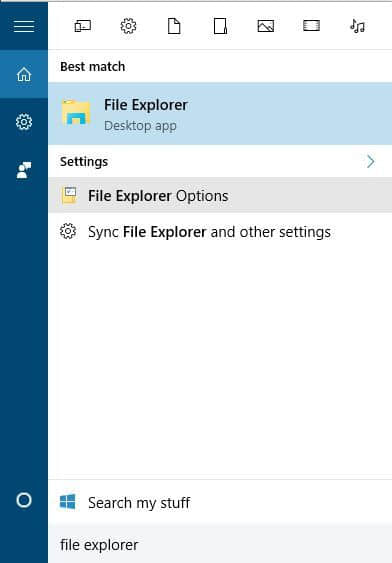
  • Press Windows Key + S and type File Explorer. Choose File Explorer Options from the list.


files disappeared windows 10


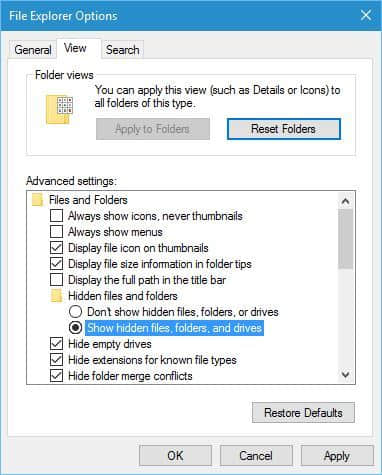
  • When File Explorer Options window opens, go to View tab. Locate Hidden files and folders option and select Show hidden files, folders, and drives.


files disappeared windows 10


  • Click Apply and OK to save changes.


After you've changed this option, try searching for the missing files and folders on your computer. In most cases, the files should be in the same folder where you left them.

3, You logged in a new user account - Switch to your old user account

In some cases, files and folders might disappear when you upgrade to Windows 10 and that’s because Windows 10 creates a new account for you by default. Your old account is still present, but it’s not set as the default account, so you have to switch to it. To do that, follow these steps:


  1. Click the Start Button and click your username at the top.

  2. You should see another account available on the list. Click it in order to switch to it.

  3. After you switch to it, all your files and folders should be available to you.

4, Virus deleted or you mistakenly deleted recover data with a third-party data recovery software

We have the third-party data recovery software Bitwar Data Recovery to help you restore missing/lost/deleted data because it can recover files lost in many situations, including those of the above mentioned.
 
This software is totally clean (it includes no bundled spyware or virus); besides, it is very user-friendly (it doesn't require any data recovery knowledge or experience). More importantly, it is very powerful (it can not only help you recover your deleted files in Windows 10/other Windows operating systems, but also find back files disappeared due to partition loss/format or system crash).

Read more? Files disappeared from Windows 10

Jak odzyskać usunięte lub utracone partycje na dysku Windows?

  Po uruchomieniu komputera zauważyłeś, że jedna z partycji zniknęła? Twoje ważne dane mogą być przechowywane na tej partycji. Jak odzyskać ...