SD card shows as a storage device on mobile phones. However, when you open "Storage" on Android, It says "SD card unexpected removed. Unmount SD card before removing to avoid data loss”? When you receive the message, you can no longer save even a single file. What is worse, the error causes the data to inaccessible, but don’t worry, let’s discuss the solution to fix it.
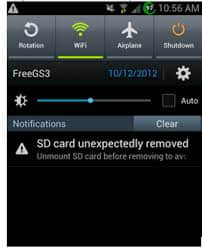
Possible Reasons for SD Card Removed Unexpectedly
Why Does My Phone Keep Saying SD Card Unexpectedly Removed? The followings are the possible reasons.
1. The connection between your phone or digital camera and SD card is loose so the device cannot detect the card successfully.
2. The SD card is not formatted. In this case, you can format your SD card. However, formatting will delete all data on the SD card. Therefore, please make a proper backup before formatting.
3. The SD card is incompatible with your device. It recommends checking the versions and instructions of both the card and your phone or digital camera to see whether they are matched.
4. Your phone or digital camera is damaged. You can connect your SD card to PC to check whether it can work. If it works fine, then it means that there is no issue with your SD card. If not, your phone or the digital camera was damaged.
5. A virus has attacked SD card. You can run antivirus software to scan the card and remove the virus.
6. The SD card is broken after long-term use. It is time to buy a new one.
How to fix the SD Card Removed Unexpectedly?
Re-install SD Card
Just unmount SD card and reboot the phone. It resolves the problem most of the time.Connect SD card to PC
Experiment as instructed. Now eject your SD card, and connect it to a PC or another functional smartphone to see if it has any problem there. If no, try a different SD card on your phone to solve the issue.
Format the SD card
Perhaps there is nothing wrong with the SD card, however, it comes up with the "not formatted" error. The "SD card not formatted" error may cause your phone unable to read it. In this case, the formatting SD card will make the trouble disappear.
Is it losing data after formatting the SD Card? How to recover data from an SD card?
We use Bitwar Data Recovery to repair SD card data. Bitwar Data Recovery is a professional memory card data recovery software, which specially designed to recover lost/deleted photos, videos, and other files from different types of storage devices including hard disk, SD card, USB disk, etc. Besides, it can help to recover lost data without affecting the original data.
Read more about Bitwar Data Recovery and see detailed tutorials:[Solved] How to fix SD Card Was Unexpectedly Removed Error


没有评论:
发表评论